DM automation
Turn comments into DMs, automatically
When someone comments a keyword on your Instagram or Facebook post, oriiion sends them a DM with your guide, link or offer. Day and night, while you get on with your work.
Comment GUIDE and we'll send you our free guide to autumn bulbs.
- anna.k GUIDEDM sent
- mikael_r guide please!DM sent
- sara.lind Love thisNo keyword, no DM
Hi Anna! Here's the autumn planting guide you asked for. Happy planting!
[your guide link]
Sent automatically by oriiionHow it works
Three steps, then it runs on its own
- 01
Pick a post and a keyword
Choose the post or Reel, and the word people should comment. GUIDE, PRICE, LINK, or a few at once.
- 02
Write the DM
A short, friendly message with your link. Write it yourself, or let oriiion draft it in your brand voice.
- 03
Approve and switch it on
You see the exact message, keyword and account before it starts. From then on, every matching comment gets its DM.
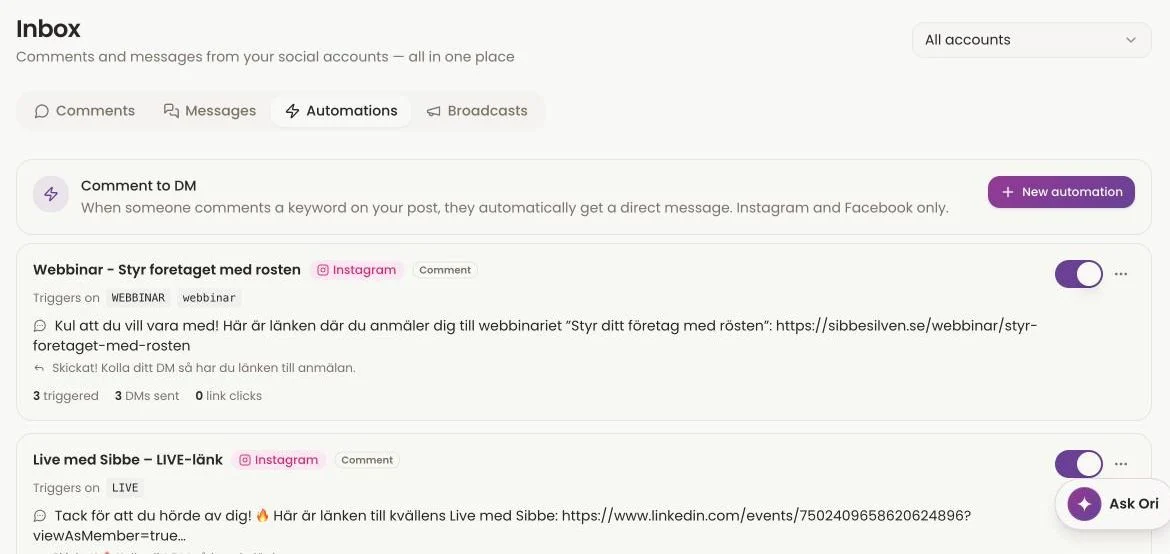
From a real account
Every automation, its keyword and its results
This is comment-to-DM on an account that uses it today: the keyword, the DM it sends and how many people got it.
What's included
Every interested comment gets an answer
Instagram and Facebook
Works on your Instagram posts and Reels, and on your Facebook Page posts.
Your message, your link
Send a guide, a booking page, a price list or a discount code. Whatever the post promised.
Broadcasts to people who wrote to you
Ask your assistant to send one message to everyone who has already messaged you on Instagram, Facebook, Telegram or Bluesky. A new menu, an opening, a last-minute slot.
Pause or delete any time
Ask your assistant to pause or delete an automation, and it stops right away.
From your AI assistant
Set it up in one sentence
Tell ChatGPT, Claude or Codex what you want. It shows you the exact DM and keyword, and waits for your yes before anything starts.
You stay in charge
Nothing is sent that you haven't approved
The exact message
Before an automation starts you see the DM text, the trigger words and which account it runs on.
The exact number
A broadcast states how many people it will reach, and won't send if that number doesn't match the real list.
Only people who reached out
DMs go to people who commented or messaged you first. Never to strangers.
FAQ
DM automation questions
Which platforms support comment-to-DM?
Instagram and Facebook. Broadcasts to people who already messaged you also work on Telegram and Bluesky.
Can I message people who never wrote to me?
No. oriiion only messages people who commented your keyword or have already sent you a message.
Can I set it up from ChatGPT or Claude?
Yes. Describe the rule in one sentence. Your assistant shows you the exact DM, the keyword and the account, and only switches it on after your yes.
How do I stop an automation?
Ask your assistant to pause or delete it. It stops right away.
Let your next post answer for you
Create your oriiion account, connect Instagram or Facebook and switch on your first automation.